The Short Answer
You can top up your Nol card from your sofa. The RTA site, the Nol Pay app and the S’hail app all take online payments. Pay by card and the money is on its way. This guide shows how to top up Nol card online UAE by app, site and machine, with instant balance.
Online top ups run from AED 5 to AED 150 per payment. The card holds up to AED 1,000 if it is anonymous. A registered card holds up to AED 5,000. The BoloSara24 team checked the RTA top up service page on 29 November 2026, and the RTA lists these limits there.
Quick Answer: Open the Nol Pay app and tap Top Up. Or go to rta.ae and pick Top Up Nol Card. Pay by card. Tap the card in the app to land the money at once.
Before you top up
Check three things first. They take a minute and they stop failed payments.
First, read your card balance. BoloSara24 checked every figure in this guide on the RTA top up page. Read the Dubai Metro Nol card guide for card types and prices. A card near its limit will not take more money. An anonymous Silver card stops at AED 1,000. A registered card stops at AED 5,000. Check the balance in the Nol Pay app before you pay.
Next, pick your amount with care. Online payments run from AED 5 to AED 150 each time. You can pay twice in a row if you need more. A weekly rider needs AED 50, but a daily rider may need more. A daily rider may need more.
Then, keep your card close. An NFC top up in the app needs the real card. A Tag ID top up on the site does not. Pick the way that fits you. Pick the way that fits you. At home with the card in hand, use the app. Away from the card, use the site.
Do you ride every day or once a week? Your answer sets your amount. A daily rider tops up more and less often. A weekly rider tops up small and more often. Both ways work. Pick the one that fits your trips.
Top up Nol card online UAE in the Nol Pay app
The Nol Pay app is the fastest way. It writes the money straight onto the card chip. No wait, no pending balance and no trip to a machine.
How to Apply: Open the Nol Pay app and log in with UAE Pass or your RTA account. Tap Top Up. Place your card on the NFC spot on the back of your phone. Hold it still till the app reads it. Pick your amount. Pay by card.
The app asks for the card to stay still. Don’t move it mid read. A move breaks the read and you start again. Take the phone case off if the read fails twice. A thick case blocks the NFC signal.
New Nol cards top up at once in the app. The RTA says the new card balance lands instantly. Older cards may show pending first. Tap the card again in the app to wake it up. The balance then shows the new figure.
The app can also run a monthly auto top up, from AED 20 to AED 500 per day. The app tops up the card when the balance drops. Set it once and your card never runs dry. Check the setting each month to keep the amount right.
Sara tops up AED 100 in the Nol Pay app each Sunday. She holds the card on her phone for two seconds. The money lands at once. She rides all week with no stop at a machine. Her brother tops up on the site. He waits for the money each time. She saves that wait every week.
Top up Nol card online UAE on the RTA site
The RTA site suits a laptop or a desktop. It needs no app. It needs your Tag ID and a card to pay with. The steps are simple.
Open rta.ae and log in with UAE Pass. Click Manage Nol Card. Pick Top Up Nol Card. Pick your card from the list or type the Tag ID. Enter the amount. Pay by credit card.
The RTA site states the wait clearly. The money takes 45 minutes to 4 hours to reach the gates. The new Nol card tops up instantly. For other cards, plan ahead. Top up the night before a busy morning. Don’t top up 10 minutes before a bus.
Wake the money up with a tap. Use the Nol Pay app to tap the card and land the balance at once. Or tap the card at any Metro gate or solar top up machine. Or use it at an online parking machine. Your Nol card can also pay for parking. Read the Dubai parking fees guide. Any of these wakes the pending money.
You must wake up the money within 180 days of the payment. The RTA states this limit on its service page.
Online Option: Use the RTA site when your phone is dead or the app will not open. The site takes the same card payment. The wait is the same. The wake up tap is the same.
Top up in the S’hail and RTA Dubai apps
Two more RTA apps take top ups. S’hail plans trips and tops up cards. RTA Dubai runs all RTA services. Pick the app you already use.
In the S’hail app, pick Top Up Nol Card. Log in with UAE Pass. Pick the card and the amount. Pay by card. Then wake the money up. Open Check Card Info in the app. Tap the card and wait for the app to read it. The balance lands at once.
In the RTA Dubai app, the steps match. Pick Top Up Nol Card. Pick the card. Pay. Wake the money up with a tap in the Nol Pay app or at a gate. The money follows the same 45 minute to 4 hour window.
Both apps take the same limits. A Gold card pays double on Metro and tram. AED 5 is the least you can pay online. AED 150 is the most per payment. The card limits stay the same. Anonymous cards stop at AED 1,000. Registered and Personal cards stop at AED 5,000.
Keep one app as your main top up app. Pick Nol Pay for instant top ups. Pick S’hail for trip plans with a top up on the side.
Top up at a machine or a shop
Online is not the only way. Machines and shops suit cash payers. They also suit riders who want the money on the card at once.
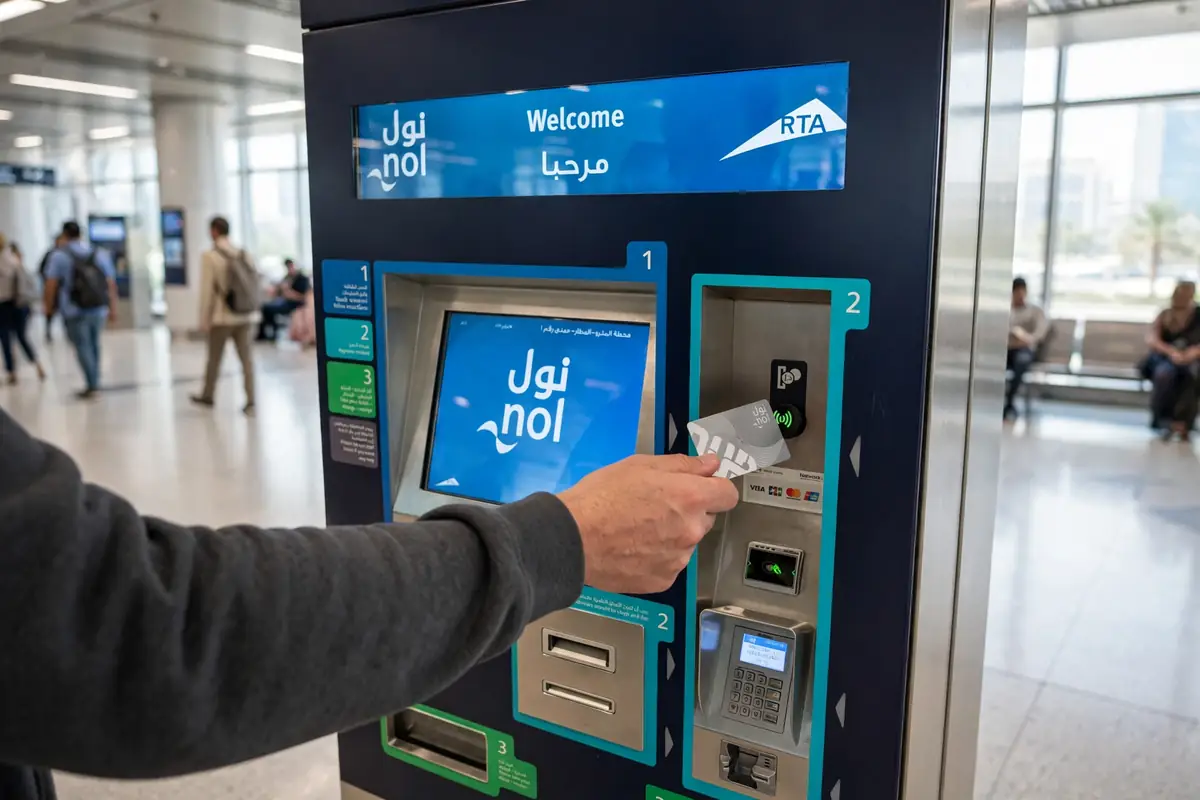
Metro ticket vending machines sit in every station. Place the card on the reader pad. Pick the top up choice. Enter the amount. Pay by cash notes or by card. The money lands on the card at once. No wait. No pending balance.
Ticket office counters sit in the same stations. Hand the card to the staff. Tell them the amount. Pay and the money lands at once. The office suits riders who want help with the machine.
Solar top up machines sit at bus stops across Dubai. The card also pays for the public transport network in Dubai and the Dubai ferry. Tap the card and top up there. They suit a rider who waits for a bus. The money lands at once.
Authorised shops and petrol stations can top up a card too. Hand the card to the agent. Pay the amount. The agent tops up the card on the spot. Ask for a receipt. Keep it till the balance shows right.
Omar tops up AED 50 at the Mall of the Emirates machine each week. He pays cash and the money lands at once. His wife tops up online in the app. Both ways put the same money on the card. The machine way suits cash. The app way suits cards.
Limits, fees and pending money
Know the limits before you pay. They stop surprises at the payment screen.
| Limit | Figure |
|---|---|
| Least online top up | AED 5 |
| Most online top up | AED 150 |
| Most balance, anonymous card | AED 1,000 |
| Most balance, registered or Personal card | AED 5,000 |
| Wait for online money at gates | 45 minutes to 4 hours |
| Days to wake up pending money | 180 days |
| Monthly auto top up, least per day | AED 20 |
| Monthly auto top up, most per day | AED 500 |
The RTA page also lists bank apps that can top up a card.
A pending top up is normal for site payments. The money leaves your bank at once. It reaches the gates in 45 minutes to 4 hours. It sits as pending till you tap a reader. Tap it in the app and it lands at once. Don’t pay twice because the first payment looks pending. Check the balance first. You can’t undo a second payment in a hurry, so wait and look first.
A failed payment needs a different fix. Check your bank card first. BoloSara24 will update this guide when RTA limits change. Check the amount next. An amount over AED 150 fails online. An amount that pushes the card over its limit fails too. Drop the amount and try again.
Mistakes that waste money and time
Most top up pain comes from small slips. Read this list once and your top ups run smooth.
Common Mistakes: Topping up right before a bus and finding the money still pending. Paying twice for one top up. Topping up a card that sits near its limit. Typing a wrong Tag ID on the site.
Top up the night before. A night top up lands by morning in most cases. Don’t leave it till the last minute. A morning top up may still sit pending at the gate. A night habit beats a morning rush.
Check the balance before you pay again. A payment that looks lost may sit as pending. A second payment doubles your money on the card. That is not a loss, but it ties up cash you may need.
Type the Tag ID slow. One wrong digit sends the money to the wrong card. Don’t rush this step. Read the number off the card. Check each digit twice. A wrong Tag ID payment is hard to undo.
Tip: Set a weekly top up reminder on your phone. Sunday night works for most riders. Top up, tap the card in the app and ride the week with no worry.
Frequently Asked Questions
How do I top up my Nol card online?
Open the Nol Pay app and tap Top Up, or go to rta.ae and pick Top Up Nol Card. Pay by card. Tap the card in the app to land the money at once.
What is the minimum top up for a Nol card online?
The least online top up is AED 5. The most per online payment is AED 150. You can pay twice in a row if you need more money on the card.
Why is my Nol top up still pending?
Online top ups take 45 minutes to 4 hours to reach the gates. The money shows as pending till then. Tap the card in the Nol Pay app or at a machine to land it at once.
Can I top up a Nol card without the card in hand?
Yes. Use the RTA site with your Tag ID. Pay by card and wake the money up later with a tap. The app top up needs the real card for the NFC tap.
What is the maximum balance on a Nol card?
An anonymous Silver or Gold card holds up to AED 1,000. A registered card and a Personal Blue card hold up to AED 5,000. Check your balance before you top up.
Can I set an automatic Nol top up?
Yes. The Nol Pay app can run a monthly auto top up. Set at least AED 20 and at most AED 500 per day. The app tops up the card when the balance drops.
Official Sources
- RTA top up Nol card service: RTA explains online top up, limits, the wait time and how to wake up the balance.
- RTA Nol Fares page: RTA lists the 7 zones, transfer rules and travel pass prices.
- RTA choose Nol card page: RTA lists card prices, max balances and concession fares.
Disclaimer: BoloSara24 is an independent guide. It is not linked to the RTA. Top up limits can change, so confirm the latest limits on the RTA top up service page before you pay.
Last Updated: 29 November 2026.