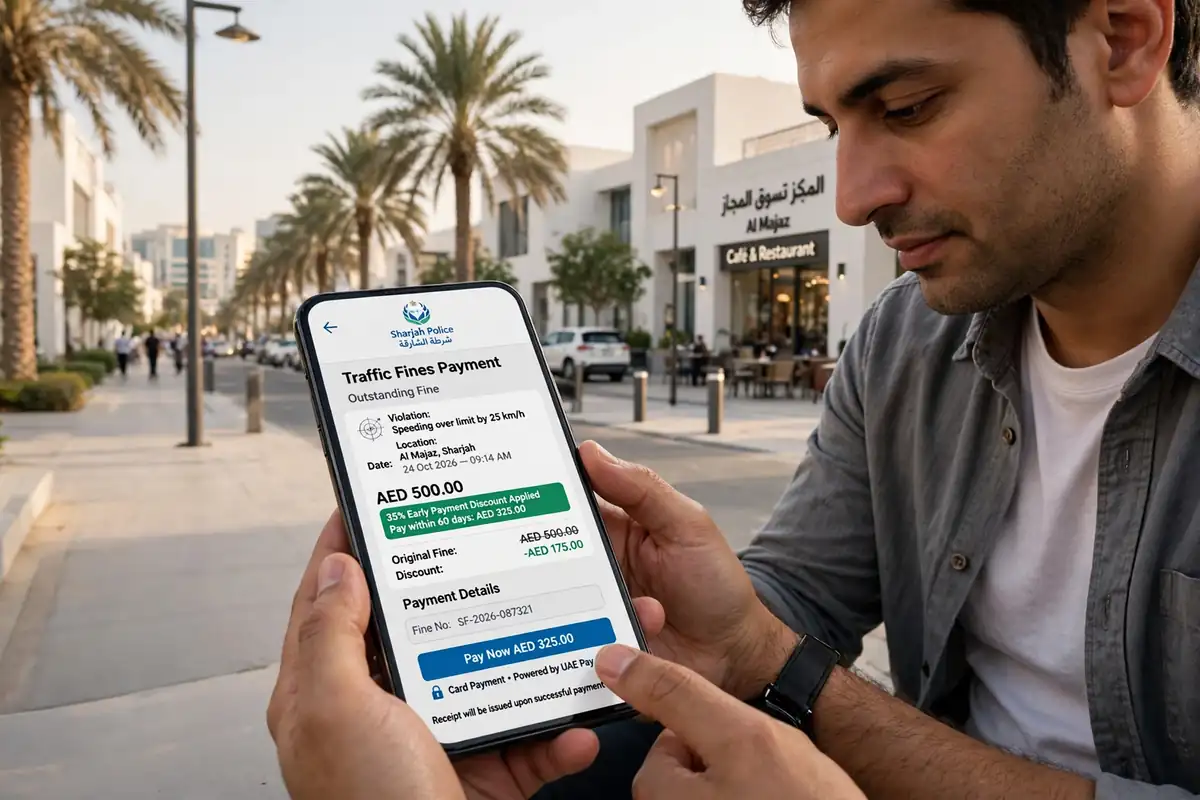
You can pay Sharjah traffic fine online UAE from your phone in a few minutes. You don’t need to visit a police station. You don’t need to queue at a counter. The Sharjah Police website and the MOI UAE app both take card payments. This guide shows each step in plain words. It also shows the discount you can get when you pay early. BoloSara24 checked the steps on the official pages on 29 November 2026.
Quick Answer: Open the MOI UAE app or the Sharjah Police website. Sign in with UAE PASS. Search by plate number or traffic file number. Pick the fines you want to clear. Pay by card. Save the receipt. Pay within 60 days of the fine date and Sharjah cuts 35% off the fine. Pay within one year and you still get 25% off.
Pay Sharjah Traffic Fine Online UAE in 6 Steps
The fastest way to pay Sharjah traffic fine online UAE is the MOI UAE app. It lists fines from all seven emirates in one place. The Sharjah Police website works well too.
Step 1: Open the MOI UAE app on your phone. You can also open moi.gov.ae on a computer. Download the app from the App Store or Google Play if you don’t have it yet.
Step 2: Sign in with UAE PASS. UAE PASS is the single sign-in for UAE government services. Keep your phone near you. The app may ask you to approve the sign-in on your phone.
Step 3: Open Traffic Fines. On the website, go to E-Services, then Traffic and Licensing, then Payment of Traffic Fines.
Step 4: Search for your fines by plate number, traffic file number, or driving licence number. Enter the plate code and the plate source too. Sharjah plates use the Sharjah source. A wrong source shows no fines.
Step 5: Read each fine before you pay. Each line shows the amount, the date, the place, and the black points. Look at the date first. It decides your discount.
Step 6: Pick the fines and pay by card. Use a debit card or a credit card. Apple Pay and Samsung Pay also work on the MOI app. Save the receipt for each fine. It carries the fine number.
What You Need Before You Pay
Have three things ready. First, your plate number with its code and source. Second, your traffic file number if you have it. Third, your UAE PASS login and a bank card. You don’t need your Emirates ID card in hand for a plate search.
Your traffic file number is the TC number on your driving licence. A plate search finds fines on the car. A traffic file search finds fines on you as a driver. Check both.
Ahmed drives a Sharjah car to work in Dubai each day. He got a speeding fine near Al Majaz. He searched by plate and found it in two minutes. He paid it on day 40 and saved 35%. His brother searched only by licence and missed a fine on the shared family car.
Note: A parking fine is not a police fine. Sharjah City Municipality issues parking fines. You pay those on the municipality website or the Digital Sharjah app. Don’t mix the two bills. This guide covers police traffic fines only.
Sharjah Traffic Fine Discount: 35% and 25%
Sharjah gives a real discount when you pay early. The Sharjah Executive Council approved the scheme on 8 July 2025. It runs all year. It is not a short campaign. The discount applies on its own. You don’t need to apply for it.
| When You Pay | Discount | What It Covers |
|---|---|---|
| Within 60 days of the fine | 35% | Fine, impound fees, storage, late charges |
| Day 61 to one year | 25% | Fine only |
| After one year | 0% | Full amount |
The 60 days start from the date of the fine. They don’t start from the day you find out about it. A fine dated 1 October gives 35% off till 30 November. Pay on 1 December and the discount drops to 25%. Mark the date on your phone when a fine arrives.
A fine of AED 800 costs AED 520 if you pay within 60 days. The same fine costs AED 600 within one year. Wait past one year and you pay the full AED 800. A driver with three AED 800 fines saves AED 840 by paying early.
Not every fine gets a discount. Sharjah Police lists 40 serious violations with no discount at all. These are high-risk acts. Jumping a red light sits on that list. Using a hand-held phone while you drive sits on it too. The full list sits on the Sharjah Police website. Check it before you count on a discount.
Example: Sara got two fines in one week. One was for speeding. One was for using her phone while driving. The speeding fine showed a 35% discount. The phone fine showed no discount. She paid both on the same day. The screen showed the exact amount for each fine before she paid.
Where to Pay: Sharjah Police, MOI and EVG
Three official channels take Sharjah traffic fines. Each one is free to check. You pay only the fine itself. Pick the channel that fits the details you have.
The Sharjah Police website is the direct channel. Go to shjpolice.gov.ae. Open E-Services, then Traffic and Licensing Services. Choose Traffic Fines Inquiry. Sign in with UAE PASS or search by plate, traffic file, or licence number. You can check and pay in the same visit.
The MOI UAE app and website cover all seven emirates. This helps if you drive in more than one emirate. One login shows Sharjah fines next to Dubai and Abu Dhabi fines. You can clear them all in one session. The MOI site also lists the service on the UAE government portal at u.ae.
Emirates Vehicle Gate, known as EVG, is a third federal channel. It shows fines by plate number. It suits drivers who don’t have UAE PASS ready.
The Sharjah Police app is a fourth choice. It runs on iPhone and Android. It checks and pays fines the same way as the website. Turn its fine notices on. A notice on day one gives you the full 60 days to act.
Fees: Checking a fine costs nothing on any official channel. Payment takes a debit card or a credit card. The MOI app also takes Apple Pay, Samsung Pay, and Google Pay. No channel asks for a fee to check. If a site asks for a check fee, close it. It is not an official page.
How to Pay Sharjah Traffic Fine Online UAE on the MOI App
The MOI app is the choice most drivers pick. Here is the full path, screen by screen. The steps take about five minutes once you know them.
Open the app and sign in with UAE PASS. Tap Traffic Fines on the home screen. The app shows a search box. Enter your plate number, plate code, and plate source. Or enter your traffic file number. Tap Search.
The list shows each fine with its date and amount. Tap a fine to see its full detail: the place, the violation, and the black points. Match the plate number to your car.
Pick the fines you want to pay. The app adds them up and shows the total. The total already has the discount in it. Pay by card. The app shows a success screen with a receipt number. Save a screenshot and the receipt. The traffic file updates right away in most cases.
Did the fine stay on the list after you paid? Wait a few hours and check again. If it still shows after one day, call Sharjah Police on 901 with your receipt number ready.
Payment: Keep a card with enough balance before you start. If a payment fails, check your bank first. Then check the fine list. Never pay the same fine twice in a rush.
Common Mistakes That Cost Drivers Money
Most drivers lose money on small slips, not big ones. Each one is easy to avoid. BoloSara24 lists them here so you can skip them.
Common Mistakes: Paying after the 60 days pass is the top slip. The discount drops from 35% to 25% on day 61. That is AED 80 more on an AED 800 fine. Set a phone reminder for day 50. That gives you ten days to pay.
Searching with the wrong plate source is next. A Sharjah plate searched under Dubai shows nothing. The fine sits there and the discount clock keeps ticking.
Some drivers pay a parking fine on the police site. The police site won’t take it. Parking fines belong to Sharjah City Municipality. Match the fine to the right body.
Do and Dont: Do save every receipt with its fine number. Do check both plate and traffic file. Do pay within 60 days. Don’t pay on a random link from a text message. Don’t share your UAE PASS code with anyone. Don’t trust a site that asks for a check fee.
Fake fine messages are real. A text may claim you have a fine and link to a payment page. Real Sharjah Police messages never ask you to pay through a text link. Open the MOI app yourself. Type the address by hand.
What If the Fine Looks Wrong
A fine can look wrong. The car may have been with someone else. The plate may read wrong on the camera. The date may not match your trip. You can dispute it. Don’t pay a fine you plan to dispute. Payment can close the case.
Start with the detail page on the MOI app or the Sharjah Police site. Note the fine number, date, time, and place. Then file a dispute through the same channel or at a Sharjah Police service centre. Bring your Emirates ID and the car papers. Read our BoloSara24 guide on how to dispute a traffic fine in the UAE for the full steps.
Black points matter as much as money. Most fines add black points to your licence. The UAE black points system can suspend a licence at 24 points. A dispute that clears a fine also clears its points. Read our guide on the UAE black points system to see the limits.
If you drive in Dubai too, the same MOI login shows Dubai fines. Read our guide on how to pay traffic fines in Dubai. If you only want to check first, read how to check UAE traffic fines by plate number. For the full discount picture, read our guide on the UAE traffic fine discount. Sharjah parking tickets need a different page, so read our Sharjah parking guide for those.
Frequently Asked Questions
Can I pay Sharjah traffic fine online UAE without UAE PASS?
Yes, in part. The Sharjah Police website and EVG let you search by plate number without UAE PASS. You still need a card to pay. The MOI app needs UAE PASS for the full service. A plate search works for a quick check.
How much discount do I get if I pay within 60 days?
You get 35% off. The discount covers the fine plus impound fees, storage charges, and late charges. It applies on its own at payment. The 40 serious violations on the Sharjah Police list get no discount.
What is the discount if I pay after 60 days?
You get 25% off the fine only. This runs from day 61 to one year after the fine date. After one year you pay the full amount. Impound and storage fees get no discount in this window.
Can I pay a Sharjah fine from Dubai or Abu Dhabi?
Yes. The MOI UAE app works from anywhere in the UAE. It shows fines from all seven emirates. You can pay a Sharjah fine while you sit in Dubai or Abu Dhabi. You need only your phone and a card.
How do I get a receipt after I pay?
The app or website shows a receipt right after payment. It carries the fine number and the amount paid. Save a screenshot. The MOI app also keeps a payment history you can open later. Keep the receipt till the fine clears.
What should I do if my payment fails?
Check your bank balance first. Then check the fine list to see if the payment went through. If the fine still shows, try again after a short wait. If it still fails, call Sharjah Police on 901 with the fine number ready.
Official Sources
Sharjah Police: Traffic fines inquiry and online payment on the official Sharjah Police website.
Ministry of Interior (MOI): Traffic fines inquiry and payment for all seven emirates on the MOI portal and app.
Emirates Vehicle Gate: Federal channel to check fines by plate number.
UAE Government Portal: Official UAE portal that lists traffic fines services and payment channels.
Disclaimer: This guide gives general facts only. It is not legal advice. Fines, discounts, and service steps can change. Check the Sharjah Police website or the MOI portal before you pay.
Last Updated: 29 November 2026.